
Harmony and lyrics lanes
battuta has three annotation lanes over the same music, independent of each other:
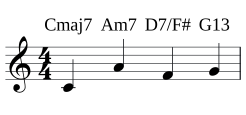
- chord symbols above the staff —
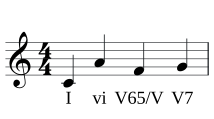
Cmaj7,Am7,D7/F# - Roman numeral analysis below the staff —
I,vi,V65/V - lyrics under the notes — their own section below
Both are real MEI <harm> control events anchored to the note you attached them
to, so they render in both views, travel with copy and paste, and undo like
anything else.
Typing a symbol
Section titled “Typing a symbol”- Put the caret on the note the symbol belongs to.
- Open the harmony select in the status bar and pick the lane.
- Type. A small editor floats at the caret showing what you have so far, green while the text is a complete symbol, red while it isn’t yet.
- Press Enter — the symbol is committed and the caret advances to the next event, ready for the next one.
| Key | In the harmony lane |
|---|---|
| Tab | Autocomplete from the suggestions shown beside the buffer |
| Enter | Commit and advance to the next event |
| ← / → | Commit and move |
| Backspace | Delete a character |
| esc | Commit and leave the lane |
Landing on an event that already has a symbol loads it for correction. Committing an empty buffer deletes the symbol. Every commit is one undo step.
The grammar is closed
Section titled “The grammar is closed”The lane only accepts characters that can extend a valid symbol. That sounds restrictive; in practice it means you cannot produce an annotation that is half-typed nonsense, and the analysis stays machine-readable.
Chord symbols — a root A–G with optional b/#, a quality, extensions
and alterations, and an optional slash bass:
C Cm C7 Cmaj7 Cm7 C6 Cm6 C9 Cmaj9 C11 C13Cdim Cdim7 Cm7b5 Cø7 C°7 Caug C+ Csus4 Csus2Cadd9 C7b9 C7#9 C7b5 C7#5 C7alt C-7 CΔ7 D7/F#Roman numerals — upper or lower case numerals, °/ø/+ qualities,
figured-bass inversions, secondary dominants with a slash, accidental prefixes,
and the borrowed chords:
I i ii ii7 iii III+ IV iv V V7 V65 V43 V42vi vii° vii°7 viiø7 I6 I64 bII bIII bVIN6 It+6 Fr+6 Ger+6 V65/V vii°7/iiIncomplete text is not silently accepted — if you leave the lane with a buffer that isn’t a valid symbol, battuta tells you and keeps the buffer so you can finish it.
Lyrics
Section titled “Lyrics”| Keys | Action | Applies |
|---|---|---|
| l | lyrics lane: type at the caret, space/enter advances, - hyphenatesplugin | any time |
l at the caret (or lyrics in the harmony select) opens the lyrics lane — one verse of syllables, typed the way MuseScore users expect:
- type the syllable, then space or enter commits it and jumps to the next note (rests are skipped);
- - commits it with a hyphen: the word continues on the next note, and
battuta tracks the word position for you (
hel-lobecomeshel+lojoined by the drawn hyphen); - arrows commit and move one event; esc commits and leaves the lane.
Syllables are MEI <verse n="1"> content inside the note itself, so they
render in both views, travel with the note through copy/paste and undo, and
survive round-trips. Chords carry the verse on their first note.