
Status bar reference
The status bar is battuta’s control panel: state on the left, context on the right. Every select shows the value in force at the caret and applies its change at the caret’s measure.

Left: what state am I in?
Section titled “Left: what state am I in?”INPUT (i)
Section titled “INPUT (i)”Grey when note input is off. Click it, or press i, to turn input on; it turns green and becomes a live duration readout.

The readout is 1/8 ♪ (4):
| Part | Means |
|---|---|
1/8 |
The duration you are about to write (2/1 for a breve) |
♪ |
Its note glyph, with the dot if one is active |
(4) |
The digit key that selects this duration |
Caret readout
Section titled “Caret readout”[ m 10, s 2, v 1, n 6 ] — measure, staff, voice, and the index of the event
under the caret, all counted from 1. [ — ] means there is no caret; click a note
to place one.
Driving the bar from the keyboard
Section titled “Driving the bar from the keyboard”| Keys | Action | Applies |
|---|---|---|
| F6 | focus the context bar (←/→ selects · ↑/↓ change · esc back) | any time |
F6 focuses the bar; ←/→ move between the selects. On the value selects (clef, key, meter) ↑/↓ cycle the value and apply it immediately — every step is one undoable command, so browsing keys by ear is safe. On the action selects (staves, voices, harmony) they open the menu instead. esc returns to the score.
Right: context and tools
Section titled “Right: context and tools”staves
Section titled “staves”Shows the staff count. Operations:
- add staff below — appends a treble staff with whole-measure rests in every measure, and moves the caret there.
- remove caret staff — removes the caret’s staff from the entire score. The last staff is refused.
voices
Section titled “voices”Shows the caret’s voice. Operations: switch to any voice of the caret’s staff, add a voice (from the caret’s measure onward), remove this voice (from the caret’s measure onward). A staff’s last voice is refused.
harmony
Section titled “harmony”Opens an annotation lane at the caret:
- chord symbols — above the staff
- roman numerals — below the staff
See Harmony lanes.
Staff-local. Stepping onto another staff updates the indicator.
| Option | Clef |
|---|---|
| 𝄞 treble | G clef on line 2 |
| 𝄢 bass | F clef on line 4 |
| 𝄡 alto | C clef on line 3 |
| 𝄡 tenor | C clef on line 4 |
| 𝄞 octave down | Treble, sounding an octave lower |
A clef battuta doesn’t offer but finds in your file is displayed as it is, and stays untouched unless you change it.
Score-wide from the caret’s measure onward: 7♭ … 1♭, ♮ (0), 1♯ … 7♯.
Score-wide from the caret’s measure onward: 4/4, 3/4, 2/4, 2/2, 3/2, 6/8, 9/8, 12/8, 5/4, 7/8, 5/8, 3/8. A meter already in your file that isn’t on the list is shown and preserved.
A meter change is validated against every measure up to the next meter change and refused — naming the first measure that no longer fits — if existing content would become invalid. Whole-measure rests always fit.
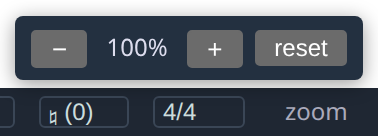
Click for + / − / reset: 50 % to 250 % in 25 % steps. Also ctrl + + / − / 0. Remembered between sessions.
| Reads | Means |
|---|---|
MIDI >< grey |
No controller connected |
MIDI <> green, with a count |
Controllers connected — click to list them |
Devices hot-plug, so the indicator follows what you plug in while battuta runs.
The header’s performance numbers
Section titled “The header’s performance numbers”The ⏱ button in the header shows or hides render timings — per-tile milliseconds, cache statistics, edit latency. They are diagnostics, off by default; turn them on if you want to see why something felt slow, or to include numbers in a bug report.