
Measures, staves and voices
Everything on this page changes the shape of the score rather than its notes. All of it is one undo step per action, and all of it reverts exactly.
Measures
Section titled “Measures”| Keys | Action | Applies |
|---|---|---|
| ⊞+ ⊞− ⊞* | insert / delete / duplicate measure (numpad) | any timefixed |
Numpad +, − and * (also on the on-screen keyboard) insert, delete and duplicate measures; the numpad keys do the same thing. Without a selection they act on the caret’s measure; with a block they act on the block’s measure range, so a three-measure block duplicates three measures.
New measures arrive with the right staff shape — every staff, and every voice of their neighbour, filled with whole-measure rests.
Measure numbers stay sane. Insert, delete and duplicate renumber the measures sequentially afterwards; a pickup measure keeps its 0-based numbering, and editorial numbering that isn’t a plain number is never touched. Undo restores the original numbers exactly.
Staves
Section titled “Staves”The staves select in the status bar shows the staff count and offers two operations:
- add staff below appends a treble staff, gives every measure a whole-measure rest on it, and puts the caret on the new staff’s first measure so you can start typing straight away.
- remove caret staff removes the caret’s staff from the whole score — its definition, any mid-score redefinitions, its content in every measure, and the control events anchored to it. The last remaining staff is refused.
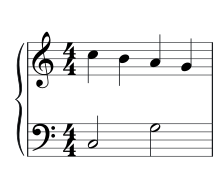
Grouping staves
Section titled “Grouping staves”| Keys | Action | Applies |
|---|---|---|
| shift + g | staff group cycle: none → brace → bracket | block selection spanning staves |
Select a block spanning the staves to group (drag a rectangle, or shift-click
across them) and press shift + G: the group symbol
cycles none → brace → bracket → none, with barlines drawn through the
group while a symbol is on. The staves must be adjacent, and a range that
would cut across an existing group is refused. Page view draws the brace or
bracket at every system start; the grouping is a <staffGrp> in the MEI, so
it survives round-trips like everything else.
Voices
Section titled “Voices”Voices are per staff and per measure. The voices select shows the caret’s voice and offers switch, add and remove.
- add a voice puts a new voice — whole-measure rests — into the caret’s staff from the caret’s measure onward, the same scoping rule clef, key and meter changes use. At measure 1 that means the whole score.
- remove this voice takes it out from the caret’s measure on, together with the control events anchored to it. A staff’s last voice is refused.
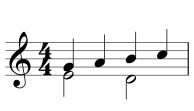
A voice added mid-score draws the engraver’s double barline at the boundary where it starts (an existing special barline is left alone).
Note entry works in any voice exactly as it does in voice 1. Where a staff has more than one voice, battuta tints them so you can see which one you are in: voice 1 blue, voice 2 violet, voice 3 amber, voice 4 magenta. The caret and selection colours always win over the tint.
↑ and ↓ traverse voices before staves — see Navigation.
Clef, key and meter
Section titled “Clef, key and meter”The clef, key and meter selects always show the context in force at the caret, and picking a value applies the change at the caret’s measure.
| Select | Scope | Options |
|---|---|---|
| clef | the caret’s staff | treble, bass, alto, tenor, octave-down treble |
| key | score-wide, from the caret’s measure | 7♭ through 7♯ |
| meter | score-wide, from the caret’s measure | 4/4, 3/4, 2/4, 2/2, 3/2, 6/8, 9/8, 12/8, 5/4, 7/8, 5/8, 3/8 |
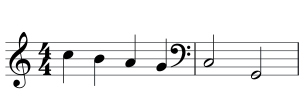
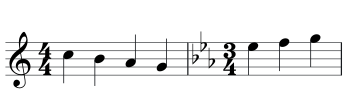
At measure 1, battuta edits the score’s initial definitions in place. Mid-score it inserts the MEI-native form: an interleaved definition for key and meter, and an inline clef before the barline — the engraver’s position, and the form that survives page view and export. Repeated changes at the same place merge instead of stacking.
Downstream tiles re-render automatically, because a context change moves their cache key. That is also why a new key or meter becomes visible exactly where it changes and not before.
The score title
Section titled “The score title”The title button in the header edits the MEI title (meiHead). If the file
has no title chain at all, battuta creates one. Page view prints it; the button
relabels itself to the current title, so you can see at a glance what the score
calls itself.