
Keyboard reference
Every action, exactly as the editor defines it. This page is generated from
apps/editor/src/keymap.ts, so it cannot drift from the application — and the
application itself carries the same list under 🌣 in the header.
| Keys | Action | Applies |
|---|---|---|
| Note entry | ||
| i | toggle note input (also Insert) | any time |
| r | enter a rest (also numpad 0) | input mode |
| 1–7 | duration (7=whole … 1=64th) | input mode · physical digit row/numpadfixed |
| a–g | enter pitch | input mode · shift+A–G adds chord notesfixed |
| . | augmentation dot | any time |
| l | lyrics lane: type at the caret, space/enter advances, - hyphenatesplugin | any time |
| Accidentals | ||
| s | sharp ♯ | any time |
| vorf | flat ♭ | any time |
| n | natural ♮ | any time |
| shift + s | slur (selection) / double sharp 𝄪 | any time |
| Marks and expression | ||
| t | tie · tie chain (selection) | any time |
| , | staccato | any time |
| ; | accent | any time |
| shift + :orshift + > | marcato | any time |
| < | staccatissimo | any time |
| = | tenuto | any time |
| h | fermata | any time |
| o | coda → To Coda → segno → fine → D.S. → D.C. | any time |
| w | ornament cycle (arpeggio/tremolo/trill/mordent) | any time |
| p | dynamics cycle · hairpin (selection) | any time |
| shift + i | attack intensity: sf → sfz → rinf → rfz | any time |
| shift + p | pedal (selection) | any time |
| ⌥1–5 | fingering (shift adds) | any timefixed |
| ⌥6–0 | finger change 3-1 (6–0 = new finger 1–5) | any timefixed |
| Rhythm | ||
| m | merge with next · grace cycle (2 pitches) | any time |
| x | split in half | any time |
| shift + t | tuplet 3:2 / 6:4 (selection) | any time |
| alt + b | auto-beam measure | any time |
| ⌥←/→ | shorten / lengthen duration | any timefixed |
| shift + r | reflection cycle: inversion → retrograde → retr. inversion → backplugin | block selection |
| Repeats and form | ||
| ' | simile slash (one beat) | any time |
| " | measure repeat % → %% | any time |
| alt + r | repeat barlines 𝄆 𝄇 (block) · end repeat 𝄇 at the caret measure | works in input mode too |
| shift + g | staff group cycle: none → brace → bracket | block selection spanning staves |
| ⇧1–9 | volta number toggle | block selection · physical digitsfixed |
| Navigation and system | ||
| F6 | focus the context bar (←/→ selects · ↑/↓ change · esc back) | any time |
| ←→↑↓ | caret: events / voices / staves / lines | any timefixed |
| Home End PgUp PgDn | row start / end · previous / next row | any timefixed |
| ⊞+ ⊞− ⊞* | insert / delete / duplicate measure (numpad) | any timefixed |
| ⌃s ⌃o ⌃z ⌃y ⌃c ⌃v ⌃± ⌃0 | save / open / undo / redo / copy / paste / zoom | any timefixed |
| Keys | Action | Applies |
|---|---|---|
| Note entry | ||
| i | toggle note input (also Insert) | any time |
| r | enter a rest (also numpad 0) | input mode |
| 1–7 | duration (7=whole … 1=64th) | input mode · physical digit row/numpadfixed |
| a–g | enter pitch | input mode · shift+A–G adds chord notesfixed |
| :or. | augmentation dot | any time |
| l | lyrics lane: type at the caret, space/enter advances, - hyphenatesplugin | any time |
| Accidentals | ||
| s | sharp ♯ | any time |
| vorf | flat ♭ | any time |
| n | natural ♮ | any time |
| shift + s | slur (selection) / double sharp 𝄪 | any time |
| Marks and expression | ||
| t | tie · tie chain (selection) | any time |
| , | staccato | any time |
| ; | accent | any time |
| shift + . | marcato | any time |
| ? | staccatissimo | any time |
| = | tenuto | any time |
| h | fermata | any time |
| o | coda → To Coda → segno → fine → D.S. → D.C. | any time |
| w | ornament cycle (arpeggio/tremolo/trill/mordent) | any time |
| p | dynamics cycle · hairpin (selection) | any time |
| shift + i | attack intensity: sf → sfz → rinf → rfz | any time |
| shift + p | pedal (selection) | any time |
| ⌥1–5 | fingering (shift adds) | any timefixed |
| ⌥6–0 | finger change 3-1 (6–0 = new finger 1–5) | any timefixed |
| Rhythm | ||
| m | merge with next · grace cycle (2 pitches) | any time |
| x | split in half | any time |
| shift + t | tuplet 3:2 / 6:4 (selection) | any time |
| alt + b | auto-beam measure | any time |
| ⌥←/→ | shorten / lengthen duration | any timefixed |
| shift + r | reflection cycle: inversion → retrograde → retr. inversion → backplugin | block selection |
| Repeats and form | ||
| ù | simile slash (one beat) | any time |
| % | measure repeat % → %% | any time |
| alt + r | repeat barlines 𝄆 𝄇 (block) · end repeat 𝄇 at the caret measure | works in input mode too |
| shift + g | staff group cycle: none → brace → bracket | block selection spanning staves |
| ⇧1–9 | volta number toggle | block selection · physical digitsfixed |
| Navigation and system | ||
| F6 | focus the context bar (←/→ selects · ↑/↓ change · esc back) | any time |
| ←→↑↓ | caret: events / voices / staves / lines | any timefixed |
| Home End PgUp PgDn | row start / end · previous / next row | any timefixed |
| ⊞+ ⊞− ⊞* | insert / delete / duplicate measure (numpad) | any timefixed |
| ⌃s ⌃o ⌃z ⌃y ⌃c ⌃v ⌃± ⌃0 | save / open / undo / redo / copy / paste / zoom | any timefixed |
Modifier conventions
Section titled “Modifier conventions”| Written | Means |
|---|---|
| shift + s | An uppercase letter binding — hold shift |
| alt + b | Hold alt (option on macOS) |
| ⌃s | ctrl + s (⌘ on macOS) |
| ⌥1–5 | alt + the digits 1 to 5 |
| ⊞+ | The numeric keypad’s + |
| 1–7 | The digit row or the keypad, matched by key position |
System chords
Section titled “System chords”These are fixed:
| Keys | Action |
|---|---|
| ctrl + s | Save (ctrl + shift + s = save as) |
| ctrl + o | Open |
| ctrl + z | Undo |
| ctrl + shift + z / ctrl + y | Redo |
| ctrl + c / ctrl + v | Copy / paste a block |
| ctrl + + / ctrl + − / ctrl + 0 | Zoom in / out / reset |
| Insert | Toggle note input both ways |
| esc | Leave input mode, or clear the selection |
| Delete / Backspace | Turn the caret’s event, or the previous one, into rests |
| alt + ← / → | Shorten / lengthen the duration |
| alt + ↑ / ↓ | Transpose a step (add shift for an octave) |
Rebinding
Section titled “Rebinding”Open the shortcut editor with 🌣. It lists every action by group with its current keys.
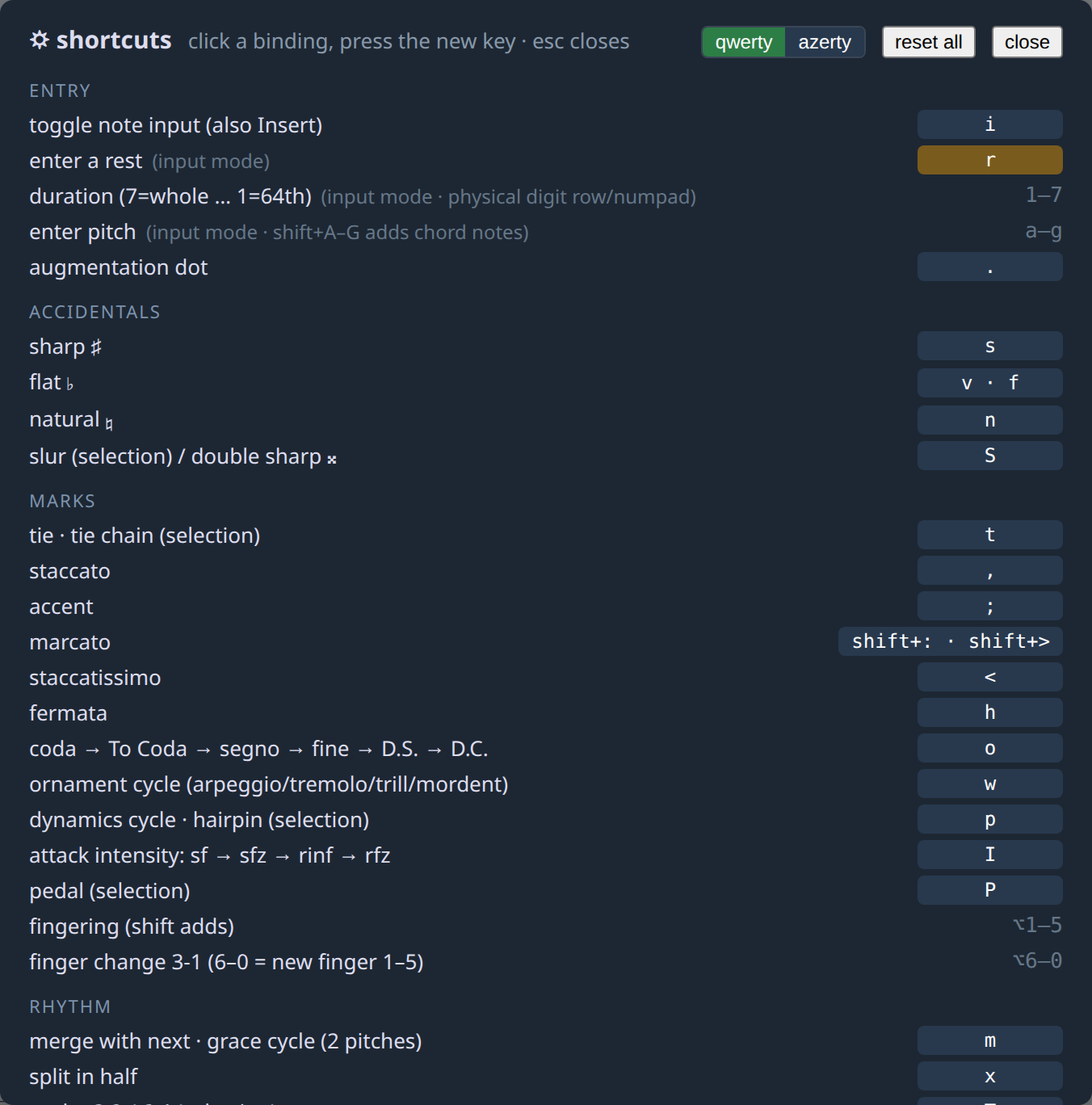
- Click a binding.
- Press the key you want. Letters keep their case, alt is recorded, and shift is explicit for symbols.
- A duplicate shows an amber warning — battuta lets you do it, but tells you.
Reset all restores the defaults. Overrides are stored per layout in the browser’s local storage, so they survive restarts, and switching layouts switches override sets too.
QWERTY and AZERTY are separate maps
Section titled “QWERTY and AZERTY are separate maps”The two layouts have separate defaults, because a single merged map
double-books keys: QWERTY’s simile key ' is AZERTY’s unshifted digit-4, which
collides with the duration row in input mode. Only the punctuation bindings
differ; letters and the physical-key bindings are identical.
Pick your layout in the shortcut editor. Bindings match on the character a key produces, so a rebound key follows your layout rather than a physical position — except for the bindings marked fixed, which are position-matched on purpose so the duration digits and fingering keys work everywhere.