
Folder view
Most editing sessions are not one file: they are a folder of movements, a set of exercises, a directory someone sent you. The folder view puts that folder down the left of the window — the score moves over to make room, it is never covered — so opening the next score is a click instead of a dialog.
Click the 📁 in the header to show or hide it; the panel’s × does the same.
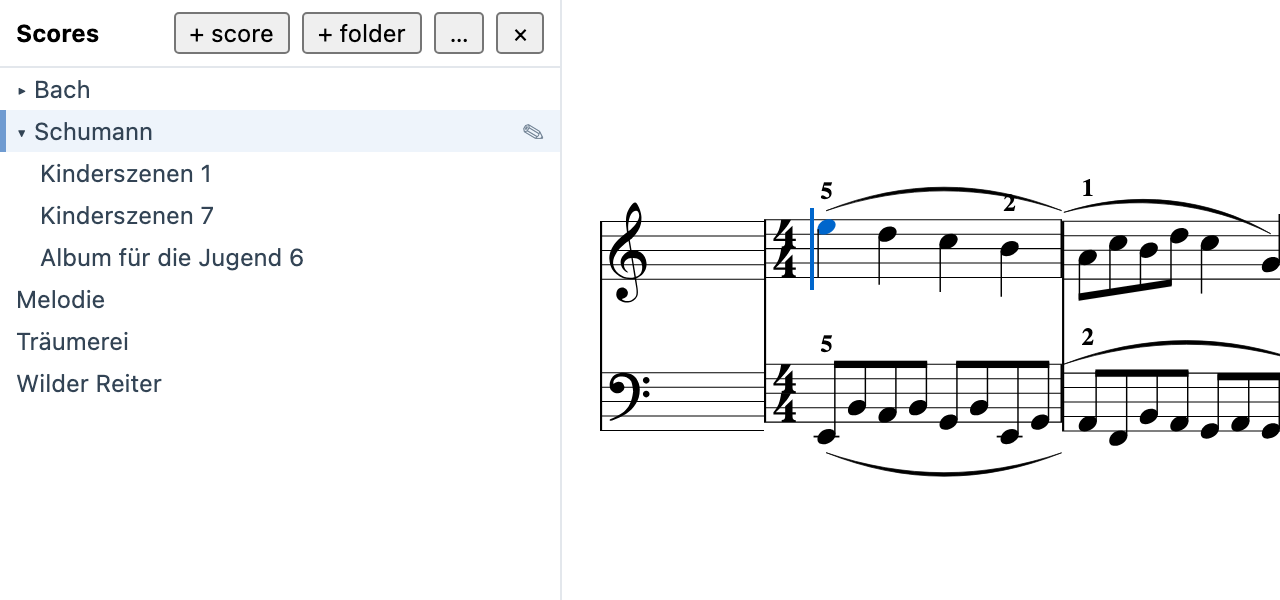
Opening a folder
Section titled “Opening a folder”choose a folder… asks the system for one. battuta can read that folder and nothing else — there is no general file access behind this, and every read outside the folder you picked is refused. Pick another one any time with the … button beside its name.
The folder you opened is remembered, so it is there the next time you start battuta. If it has moved or been deleted since, the panel says so and offers to pick another.
The list
Section titled “The list”Sub-folders open in place — click one to expand it, click again to collapse — so a folder with a directory per work behaves the way you expect. Hidden files and folders are skipped.
Click a score to open it. It opens exactly as open file… would: a file already open is brought to the front rather than opened twice, and a format that needs converting converts on the way in.
| Mark | Means |
|---|---|
| highlighted row | the score in the active tab |
trailing * |
open, with unsaved changes — the same marker the tab shows |
Renaming
Section titled “Renaming”Point at a score or a folder and a ✎ appears at the end of its row; click it — or select the row and press F2 — and the name becomes a field. Type the new one and press Enter, or click away; Esc leaves it as it was.
A score is renamed without its extension: the field shows the name the
list shows, and .mei is kept for you. A folder is renamed as typed, and
if it was open it stays open under its new name.
If the score is open in a tab, the tab follows: it takes the new name and
saves to the renamed file — nothing is written to the old name behind
your back. A name that already exists in the folder, an empty one, one
with a / in it or one starting with a dot (it would be hidden) is
refused, and a notice says why.
New scores and folders
Section titled “New scores and folders”+ score and + folder in the panel’s header create inside the folder you last clicked — or the folder of the score you last opened, or the top folder until you have done either. That folder is marked — a blue bar at the left of its row, or beside the folder’s name at the top of the panel when it is the top folder — and hovering a button names it. A field appears first inside it: type a name and press Enter, or click away; Esc changes nothing.
A new score is a blank one — a treble staff in 4/4, four empty measures,
titled after its name — saved as .mei (added for you) and opened at
once in a new tab, ready to write in. A new folder appears open and
empty, and becomes where the next score goes, so a folder of new pieces
is + folder, a name, then + score as many times as you need.
A name that already exists is refused — nothing is ever overwritten — as are the names renaming refuses.
Live file watching
Section titled “Live file watching”While the panel is up, battuta watches the folder. A score added,
renamed or deleted — by you in another program, by a sync client, by a
git pull — appears or disappears in the list without a refresh.
The same watch protects what you have open. If a file open in a tab changes on disk, battuta tells you the moment it happens:
“two.mei” changed on disk — saving will ask before overwriting
Saving still asks for confirmation before it overwrites, as it always did; the difference is that you now hear about the change while you can still do something about it, rather than at the moment you save.
Turning it off
Section titled “Turning it off”battuta menu → 🌣 shortcuts → plugins → Folder view. The 📁 and the panel go together, and battuta stops watching. Nothing about your scores changes — apart from the names you gave and the scores and folders you made, the folder view only ever reads.