
Marks and expression
Every mark on this page follows the same two rules, so there is only one thing to learn:
- The target is the note you just entered while input mode is on, otherwise the note (or chord) under the caret — or the selection, where a selection makes sense.
- Pressing again removes it. Marks toggle, cycles step forward and eventually step off. Each press is one undo step.
| Keys | Action | Applies |
|---|---|---|
| t | tie · tie chain (selection) | any time |
With no selection, t ties the caret’s note back to its predecessor — including across the barline when the note opens a measure. The pitches have to match; battuta refuses rather than write a tie between different notes.
With a run selected, t ties every consecutive pair in it, which is how you notate a note held over several measures. The same selection unties it.
Chords tie the same way, pitch by pitch: each note of the chord is tied to the note of the same pitch in its neighbour — another chord or a single note — and the notes with no partner are left alone, so a chord moving to the next one holds only the notes the two have in common. A chord that shares no pitch with its neighbour is refused.
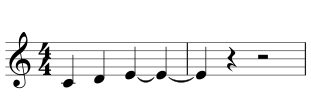
Tie chains are handled as chains, not as isolated pairs: the shared note in the middle gets the right MEI value, and untying any link splits the chain into valid remainders instead of orphaning half a tie. Playback and rendering follow automatically — a chain sounds as one attack for its whole length.
| Keys | Action | Applies |
|---|---|---|
| shift + s | slur (selection) / double sharp 𝄪 | any time |
Select a run and press shift + s, or place the caret and press it to slur to the next event. The same endpoints again remove the slur.
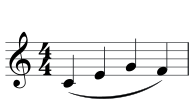
Cross-staff slurs work too: shift-click a note on one staff and a note on another — that gives an endpoint pair — then press shift + s.
With nothing selected, shift + s writes a double sharp instead. On a chord it opens the per-note picker.
Articulations
Section titled “Articulations”| Keys | Action | Applies |
|---|---|---|
| , | staccato | any time |
| ; | accent | any time |
| shift + :orshift + > | marcato | any time |
| < | staccatissimo | any time |
| = | tenuto | any time |
| h | fermata | any time |
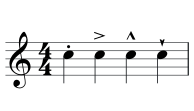
Marcato is the accent key shifted, and staccatissimo is the staccato key shifted — so there are two keys to remember, not four. (On AZERTY the shifted characters differ but the physical keys are the same.) Tenuto has a key of its own, = — a line, and the same key on QWERTY and AZERTY. Like the others it toggles, and a note can carry several: a tenuto beside a staccato is a portato. Playback holds a tenuto note for its full value; beside a staccato the staccato wins, so a portato plays short.
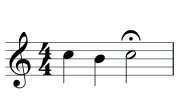
h puts a fermata over the target.
Ornaments
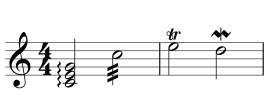
Section titled “Ornaments”w cycles through the ornaments: on a chord it starts with the arpeggio, then tremolo, trill, mordent, then off.
Dynamics
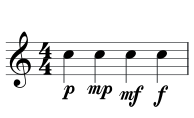
Section titled “Dynamics”p with nothing selected cycles the volume marking on the target note: p → mp → mf → f → off.
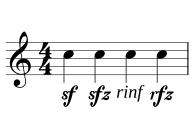
shift + i cycles attack intensity instead: sf → sfz → rinf → rfz → off. A note carries one dynamic marking at a time, so starting one cycle clears a marking from the other.
Hairpins
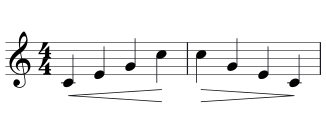
Section titled “Hairpins”p with a run selected cycles a hairpin over it: none → crescendo → diminuendo → none. Runs that cross measures are fine, and so are endpoint pairs across staves.
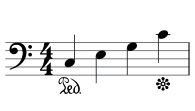
shift + p over a selection puts the pedal down at the first note and up at the last.
Fingering
Section titled “Fingering”| Keys | Action | Applies |
|---|---|---|
| ⌥1–5 | fingering (shift adds) | any timefixed |
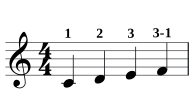
| ⌥6–0 | finger change 3-1 (6–0 = new finger 1–5) | any timefixed |
alt + 1…5 sets the fingering on the target note or chord. The same number again removes it, a different one replaces it. alt + shift + 1…5 stacks an extra finger, for chords and substitutions.
alt + 6…0 writes a change of finger on the
existing fingering, where 6–0 stand for the new fingers 1–5: alt +
2 then alt + 6 gives 2-1. The same key removes
the substitution; a different one replaces it.
These bindings are matched by physical key, so the digit row behaves the same on every keyboard layout.
All mark bindings
Section titled “All mark bindings”| Keys | Action | Applies |
|---|---|---|
| t | tie · tie chain (selection) | any time |
| , | staccato | any time |
| ; | accent | any time |
| shift + :orshift + > | marcato | any time |
| < | staccatissimo | any time |
| = | tenuto | any time |
| h | fermata | any time |
| o | coda → To Coda → segno → fine → D.S. → D.C. | any time |
| w | ornament cycle (arpeggio/tremolo/trill/mordent) | any time |
| p | dynamics cycle · hairpin (selection) | any time |
| shift + i | attack intensity: sf → sfz → rinf → rfz | any time |
| shift + p | pedal (selection) | any time |
| ⌥1–5 | fingering (shift adds) | any timefixed |
| ⌥6–0 | finger change 3-1 (6–0 = new finger 1–5) | any timefixed |
- Repeats and form — segno, coda, voltas, and playing the form.
- Harmony lanes — chord symbols and Roman numerals.