
Note entry
Turning input on and off
Section titled “Turning input on and off”i enters note input. Insert toggles it both ways, and
esc leaves it. The INPUT (i) box in the status bar is the
indicator — and a button, if you’d rather click.
While input is on, that box reads out what you are about to write:
1/8 ♪ (4) means an eighth note, and that 4 is the key that
selected it.
Durations
Section titled “Durations”| Key | Duration | Key | Duration | |
|---|---|---|---|---|
| 7 | whole | 3 | sixteenth | |
| 6 | half | 2 | thirty-second | |
| 5 | quarter | 1 | sixty-fourth | |
| 4 | eighth |
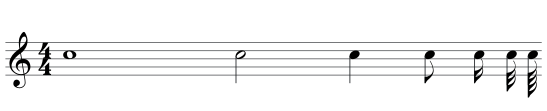
The digit sets the duration for what you write next; it never changes a note that is already there. To change an existing note, use alt + ← / → — see Rhythm.
Durations are matched by physical key position as well as by character, so the number row works on AZERTY without Shift, and the numeric keypad works everywhere.
Pitches, chords and rests
Section titled “Pitches, chords and rests”- a–g writes a note. The octave is guessed from the music around the caret, so scales and stepwise lines stay put instead of jumping.
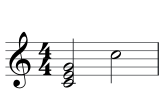
- shift + A–G adds a note to the one you just entered, building a chord.
- r (or numpad 0, right under the duration digits) writes a rest of the current duration.
Accidentals
Section titled “Accidentals”| Keys | Action | Applies |
|---|---|---|
| s | sharp ♯ | any time |
| vorf | flat ♭ | any time |
| n | natural ♮ | any time |
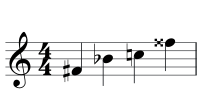
| shift + s | slur (selection) / double sharp 𝄪 | any time |
In input mode use s sharp, v flat, n natural. Outside input mode f also flattens, since no pitch letters are needed there. shift + s writes a double sharp when nothing is selected.
Pressing the same accidental twice removes it; a different one replaces it.
On a chord, battuta asks which note
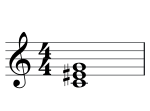
Section titled “On a chord, battuta asks which note”An accidental on a chord would otherwise sharpen everything. Instead a small
picker opens listing the chord’s notes — 1:c4 2:e4 3:g4. Press the note’s
letter or its number to apply the accidental to that note alone, esc
to cancel.
The dot
Section titled “The dot”. adds or removes an augmentation dot (on AZERTY, : is the unshifted key, and the keypad’s . works too). Press it repeatedly for a second dot.
The dot always applies to a real event: the note you just entered, or — once the caret has moved — the note or rest under the caret. It works outside input mode too. The extra time comes out of the rests that follow, and goes back to them when you remove the dot. Notes you enter afterwards inherit the dotted state — until you pick a new duration digit, which starts plain again.
Deleting
Section titled “Deleting”- Delete turns the caret’s event (or the whole selection) into rests of the same written duration. A chord becomes one rest.
- Backspace erases backward like a text editor: the previous note becomes a rest and the caret steps onto it. With a selection it behaves like Delete.
Deleting never shortens a measure — it replaces notes with rests, which is what keeps the measure valid.
Why entry is an overwrite mode
Section titled “Why entry is an overwrite mode”Writing a note does not push the rest of the measure along. It replaces what is already at the caret:
- Equal duration — swapped in place.
- Shorter — the leftover time becomes rests.
- Longer — the following events are consumed to make room, and battuta refuses loudly if that would cross a beam, a tuplet, or the barline.
The measure’s total never changes, so the document is never briefly invalid and undo always has something exact to return to. (If a longer note is blocked by a beam, battuta un-beams the measure first — see beams are formatting.)
MIDI input
Section titled “MIDI input”A MIDI keyboard is a first-class input, not an add-on. With input mode on:
- Play a note — it is entered at the caret with the current duration.
- Hold several keys down together — they build a chord.
- Release, and the caret advances.
A key is spelled the way the key signature reads it, with an accidental written only where the page needs one. Under one flat, B♭ enters as a plain B — the key carries the flat — and B as B♮. A white key is always its own letter (under four sharps, C is C♮); a black key outside the key leans the key’s way (in C: C♯, E♭, F♯, G♯, B♭; under one flat, C♯ — D minor’s leading tone). An accidental already written in the measure counts too: after a B♮, the next B needs nothing, and B♭ gets its flat back. The plain B is saved with the key’s flat as its sounding accidental, so any MEI reader plays B♭.
Devices hot-plug: connect or disconnect while battuta is running and the status
bar’s MIDI indicator updates, turning green with a device count. Click it to
see what is connected. If you play a note while input mode is off, battuta hints
that you should press i.
The desktop app bridges MIDI natively (ALSA on Linux, CoreMIDI on macOS) because
WebKit has no Web MIDI API; in Chromium the same pipeline runs on Web MIDI. On a
tablet, the iPad app bridges CoreMIDI the same way, and Android’s own WebView
has Web MIDI — a USB keyboard plugged into either tablet just works. A Bluetooth
one is paired from battuta itself: click MIDI in the status bar, then
Bluetooth MIDI… — on an iPad, Apple’s Bluetooth MIDI view lists the
instruments in range; on Android, battuta asks for nearby devices the first
time, then lists the instruments it finds. Tap one, and it joins the device
list like a USB keyboard. Every route ends in the same entry code, so behaviour
is identical.
All entry bindings
Section titled “All entry bindings”| Keys | Action | Applies |
|---|---|---|
| i | toggle note input (also Insert) | any time |
| r | enter a rest (also numpad 0) | input mode |
| 1–7 | duration (7=whole … 1=64th) | input mode · physical digit row/numpadfixed |
| a–g | enter pitch | input mode · shift+A–G adds chord notesfixed |
| . | augmentation dot | any time |
| l | lyrics lane: type at the caret, space/enter advances, - hyphenatesplugin | any time |
- Rhythm — changing durations, tuplets, beams, grace notes.
- Marks and expression — articulations, dynamics, slurs and ties.